
Lesson 65: Break-It-Friday — Debug Containerized Environments
What We’re Building Today
This is a deliberate break-and-fix session. No greenfield code. You’re handed a multi-container application that is silently failing — services can’t resolve each other’s DNS names, health checks are timing out, and the on-call alert is firing. Your job is to diagnose and remediate the misconfigured Docker networking layer before we move this system into Kubernetes next lesson.
Concrete deliverables by end of session:
Root-cause a DNS resolution failure between two containerized microservices and trace the exact Docker networking path from container to resolver
Fix a misconfigured service alias and network attachment in a real
docker-compose.ymlthat mirrors production failure patternsValidate the fix using
dig,nslookup, and container-native tooling — not just “it works now”Instrument your Docker Compose stack with explicit network declarations that prevent entire classes of DNS failures in future
Why This Matters
DNS failures in containerized environments are disproportionately common relative to how simple the underlying model is. At Netflix, a significant proportion of their early container adoption incidents traced back not to application bugs but to network topology mismatches — services deployed to different virtual networks, talking past each other at the infrastructure layer while the application layer assumed connectivity.
The failure mode is almost always invisible at deploy time. The container starts. The health check passes against localhost. The service registers as
Running. Then the first cross-service call fires, and you getconnection refusedor — worse — a 30-second DNS timeout that cascades into a latency spike that your SLO catches at 11pm.Understanding Docker’s embedded DNS resolver, how network namespaces scope service discovery, and where alias resolution fits in that chain is not optional knowledge for anyone operating containerized workloads. It is the foundation on which every Kubernetes service discovery mechanism — CoreDNS, headless services, endpoint slices — is built. You debug this now, in Docker Compose, because the mental model transfers directly and the feedback loop is orders of magnitude faster.
Architecture Deep Dive: Docker Networking and DNS Resolution
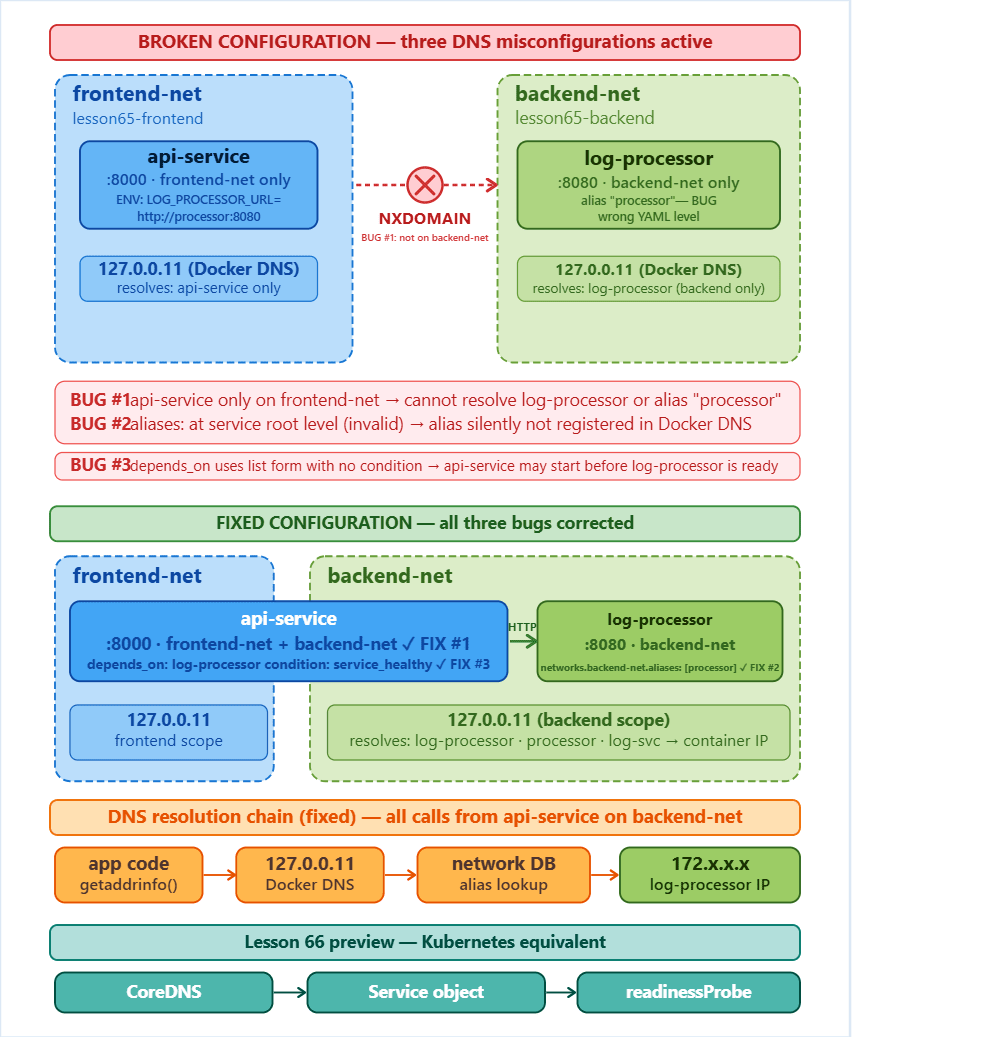
1. The Embedded DNS Resolver: What Actually Answers Your Service Calls
Every Docker container on a user-defined network gets /etc/resolv.conf pointing to 127.0.0.11 — Docker’s embedded DNS server running inside the network namespace. This resolver is not the host’s DNS. It has no awareness of your host’s /etc/hosts, your corporate DNS, or anything outside the Docker network scope.
When container api-service calls
http://log-processor:8080, the resolution chain is:
The failure point: If log-processor and api-service are on different Docker networks — even if both are running and healthy — the embedded DNS server for api-service‘s network has zero knowledge of log-processor. The lookup returns NXDOMAIN. Your application sees a connection error, but the containers themselves are perfectly healthy.
Anti-pattern: Relying on the default bridge network (bridge) for multi-container applications. The default bridge does not enable automatic DNS resolution by container name. Only user-defined networks do. This is the single most common source of “it worked in docker run but not in Compose” confusion.
2. Service Aliases: The Right Tool, Used Wrong
Docker Compose allows you to define network-scoped aliases for services:
An alias is a DNS name resolvable only within the network it’s defined on. The critical misunderstanding: aliases are network-scoped, not service-scoped. If you define an alias under the service block rather than under the specific network attachment, the behavior is undefined across Docker versions, and in practice the alias often silently fails to register.
The second failure mode: defining the alias on app-net but attaching the calling service to backend-net. The alias is valid — it resolves correctly from any other container on app-net — but the caller is on a different network and can’t reach it. No error at startup. Pure runtime failure.
3. Network Attachment Completeness
In production Compose stacks, services often span multiple networks for security segmentation — a frontend network exposed to the ingress, a backend network for service-to-service communication, a data network for database access. The failure pattern:
api cannot resolve log-processor because it has no attachment to backend-net. The fix is mechanical, but the diagnosis requires understanding that Docker’s DNS is strictly scoped to networks the container is a member of. docker inspect on the container will show exactly which networks it’s attached to and what DNS names are resolvable from its context.
4. depends_on Does Not Mean Reachable
This is a distinct failure mode that surfaces alongside DNS issues. depends_on in Compose controls start order, not network readiness or application readiness. A service can pass its depends_on check while its DNS name is not yet propagated to the embedded resolver, particularly under high-concurrency startup conditions.
Production-correct pattern:
Combined with a proper healthcheck that validates the service is accepting connections, not merely that the process started. The condition: service_healthy gate holds the dependent container in Created state until the health check passes — which means by the time api-service starts, log-processor is not only running but reachable.
The insight that changes how you think about this: depends_on with service_healthy is your first exposure to the readiness/liveness probe separation that Kubernetes formalizes. A process can be alive (liveness) without being ready to serve traffic (readiness). Docker Compose’s healthcheck mechanism is a simplified version of the same contract.
5. Debugging Toolchain: How to Actually Diagnose This
Do not attempt to debug container networking from the host. The host has a different network namespace and will give you misleading results.
# Step 1: Identify which networks each container is attached to
docker inspect <container-name> --format '{{json .NetworkSettings.Networks}}' | jq

# Step 2: Enter the failing container's network namespace
docker exec -it <api-service-container> sh

# Step 3: Check /etc/resolv.conf — confirm DNS server is 127.0.0.11
cat /etc/resolv.conf

# Step 4: Attempt resolution with explicit DNS
nslookup log-processor 127.0.0.11

# Step 5: Try alias resolution
nslookup log-svc 127.0.0.11

# Step 6: Check if the issue is DNS (NXDOMAIN) vs connectivity (timeout/refused)
wget -O- http://log-processor:8080/health --timeout=5
NXDOMAIN = DNS failure. The service name or alias is not registered on this network. Connection refused = DNS resolved, but the port isn’t open or the service crashed. Timeout = DNS resolved, network path exists, but something is dropping packets (NetworkPolicy, firewall, or the service is overloaded).
These are three completely different problems with three completely different fixes. Senior engineers don’t guess — they distinguish.
Implementation Walkthrough
GitHub Link :
https://github.com/sysdr/k8-course-p/tree/main/lesson65/lesson65-dns-debug
The Broken Stack
The generate_k8s_system.sh script in this lesson creates a deliberately broken Docker Compose environment. Here’s what’s wrong and why:
Problem 1 — Wrong network on api-service:
# BROKEN
services:
  api-service:
    networks:
      - frontend-net   # Only attached to frontend

  log-processor:
    networks:
      - frontend-net
      - backend-net    # api-service can't reach this network's aliases
    networks:
      backend-net:
        aliases:
          - processor
Fix: Add backend-net to api-service‘s network list.
Problem 2 — Alias defined at wrong level:
# BROKEN
services:
  log-processor:
    aliases:           # Wrong — this key doesn't exist at service level
      - processor
    networks:
      - backend-net
# CORRECT
services:
  log-processor:
    networks:
      backend-net:
        aliases:
          - processor
Problem 3 — Missing healthcheck on the dependency:
# BROKEN — depends_on with no condition
depends_on:
  - log-processor

# CORRECT
depends_on:
  log-processor:
    condition: service_healthy
Combined with a healthcheck on log-processor that validates HTTP reachability, not just process existence.
Validation Sequence
After applying fixes, validate in this order:
# 1. Rebuild and restart
docker compose down && docker compose up -d

# 2. Verify network membership
docker inspect log-processing-api-1 | jq '.[0].NetworkSettings.Networks | keys'

# 3. Test DNS from inside the calling container
docker exec -it log-processing-api-1 nslookup processor

# 4. Test HTTP connectivity
docker exec -it log-processing-api-1 wget -qO- http://processor:8080/health

# 5. Verify no NXDOMAIN in logs
docker compose logs api-service | grep -i "dns\|resolve\|nxdomain"
Only when all five pass do you declare the fix complete. “It works” is not a validation strategy.
Working Demo Link :
Production Considerations
Container DNS in Kubernetes
Next lesson you’ll deploy this same system to a Kubernetes cluster. The DNS model changes: CoreDNS replaces Docker’s embedded resolver, and service discovery is now cluster-wide within a namespace. The naming convention becomes <service-name>.<namespace>.svc.cluster.local. The debugging pattern is identical — kubectl exec into a pod, check /etc/resolv.conf, run nslookup — but the resolver is external rather than embedded.
Network segmentation moves from Docker networks to Kubernetes NetworkPolicies. The failure mode is the same: a pod tries to resolve a service name that’s in a namespace it has no egress policy to reach. The diagnosis is the same: resolve succeeds (CoreDNS knows about all services cluster-wide), but the TCP connection is dropped at the network layer.
Understanding the Docker model completely means the Kubernetes model is an extension, not a re-learning.
Monitoring DNS Health
In production, instrument DNS resolution latency at the application level. Slow DNS is one of the hardest problems to attribute because the application sees a slow HTTP call, not a slow DNS lookup. Libraries like Python’s aiodns expose per-resolution timing. In Kubernetes, CoreDNS metrics are available natively via Prometheus and should be part of your SLO dashboard.
Scale Connection
At Spotify’s scale — operating thousands of microservices on Kubernetes — DNS is a tier-1 reliability concern. Their internal platform teams run CoreDNS with NodeLocal DNSCache, a daemonset that places a DNS cache on every node to eliminate cross-node DNS latency and reduce CoreDNS load. Airbnb’s Kubernetes platform documentation cites DNS resolution failures as one of their top five container incident categories, leading them to implement custom DNS health checks in their deployment pipeline. The debugging muscle you’re building today — network namespace isolation, alias scoping, DNS vs. connectivity failure distinction — is the same muscle those teams use at ten thousand times the scale.
Next: Lesson 66 — Intro to Kubernetes. You’ll take this same application, containerized and validated, and deploy it to a multi-node kind cluster. The Docker networking model you’ve just mastered maps directly to what CoreDNS and Kubernetes Services implement at cluster scale.