
Lesson 26: Advanced Storage - Mastering Container Storage Interface (CSI)
What You’ll Build Today
A production-grade log analytics platform demonstrating CSI-powered storage orchestration:
Multi-tier storage architecture with fast NVMe for hot data, standard SSD for warm data, and cold storage tiers
TimescaleDB time-series cluster using StatefulSets with CSI dynamic provisioning across 3 zones
Kafka persistent streaming with volume snapshots for point-in-time recovery
Storage performance monitoring tracking IOPS, latency, and throughput across storage classes
Automated backup workflows using VolumeSnapshots and restore procedures
Why Storage Matters: A $2.3M Lesson
In 2019, a major fintech company lost $2.3M in a single incident when their Kubernetes cluster’s storage layer failed during a zone outage. They were using hostPath volumes on local SSDs without understanding that Kubernetes treats storage as cattle, not pets. When pods rescheduled to different nodes, they lost all transaction logs.
The Container Storage Interface (CSI) solved this problem by decoupling storage provisioning from Kubernetes core. Before CSI, adding support for a new storage system required modifying Kubernetes itself—a 6-12 month process involving core maintainer reviews. With CSI, storage vendors publish drivers as sidecar containers that implement a standardized gRPC interface, enabling new storage backends to integrate in days, not quarters.
Netflix operates 180+ Kubernetes clusters processing 40 petabytes of data daily. Their storage strategy uses CSI to dynamically provision EBS volumes with specific IOPS profiles based on workload requirements—encoding pipelines get io2 volumes with 64,000 IOPS, while batch analytics use gp3 with burstable performance. This multi-tier approach saves them approximately $4.2M annually compared to over-provisioning high-performance storage for all workloads.
Key insight: Storage in Kubernetes is not an afterthought—it’s the foundation that determines your data durability guarantees, recovery time objectives (RTO), and operational costs at scale.
Understanding CSI Architecture
The Three-Component CSI Model
CSI drivers consist of three mandatory components that communicate via Unix domain sockets:
1. Controller Service (Cluster-wide)
Runs as a Deployment (typically 2 replicas for HA) and handles volume lifecycle:
CreateVolume: Provisions storage on backend (e.g., AWS CreateVolume API)DeleteVolume: Cleans up resources and prevents orphaned volumesCreateSnapshot: Enables point-in-time backups without downtimeControllerPublishVolume: Attaches volume to specific node (think: AWS AttachVolume)
2. Node Service (Per-node DaemonSet)
Runs on every node where volumes will be mounted:
NodeStageVolume: Mounts block device to staging path (global mount point)NodePublishVolume: Bind-mounts from staging to pod’s specific pathNodeGetVolumeStats: Reports usage metrics for kubelet eviction policies
3. Identity Service (Both Components)
Returns driver capabilities and validates plugin readiness.
Why separate Controller and Node services?
Netflix learned this the hard way: their initial custom storage solution ran all operations on every node, causing API rate limit exhaustion when scaling from 100 to 1,000 nodes. With CSI’s separation, only Controller components make provisioning API calls, while Node components handle local mount operations. This prevents the classic “thundering herd” problem at scale.
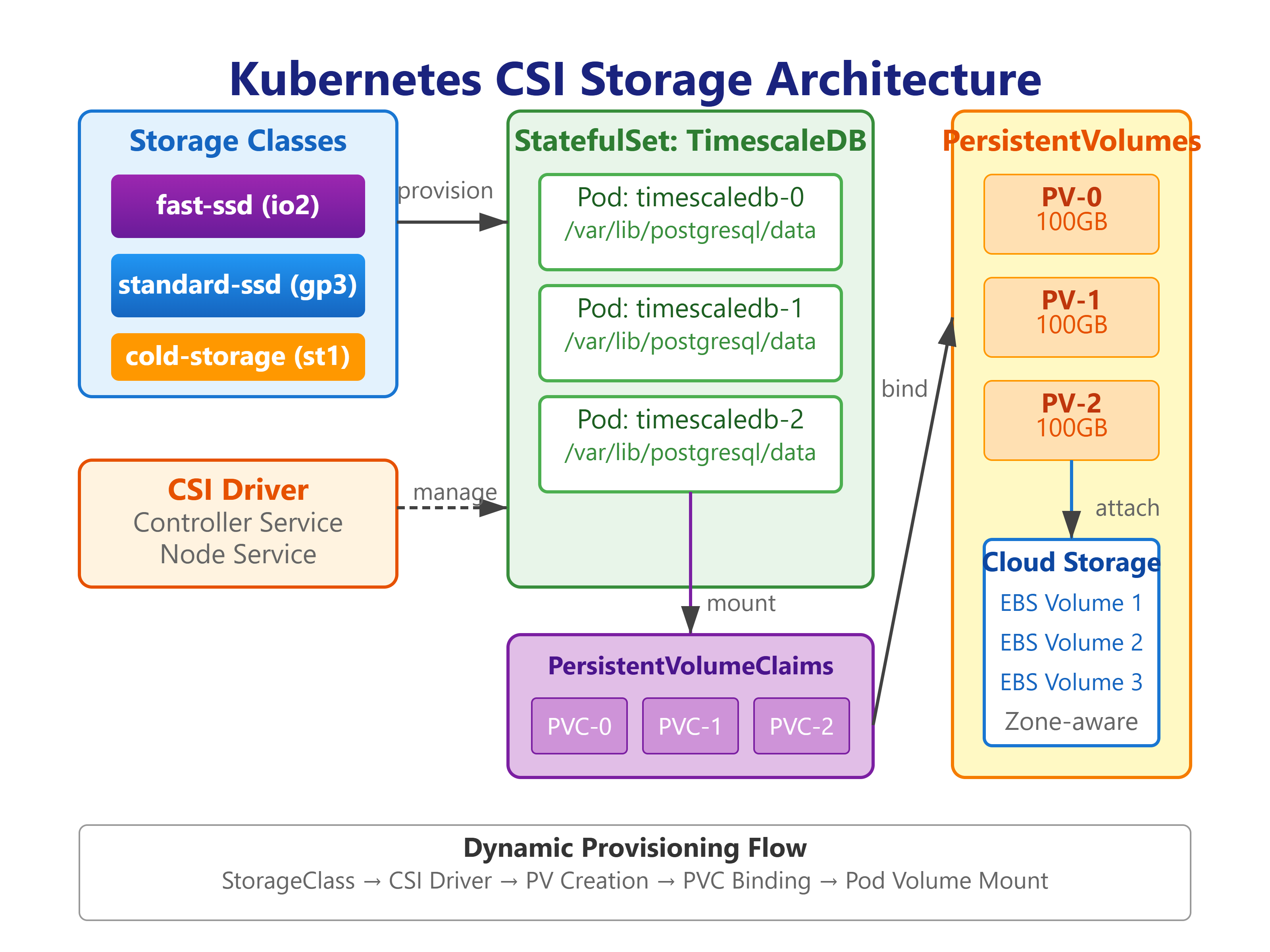
Storage Classes: Templates for Provisioning
StorageClasses are Kubernetes’ factory pattern for storage. Instead of pre-provisioning hundreds of PersistentVolumes, you define templates:
yaml
apiVersion: storage.k8s.io/v1
kind: StorageClass
metadata:
  name: fast-ssd
provisioner: ebs.csi.aws.com
parameters:
  type: io2
  iopsPerGB: "100"
  throughput: "1000"
volumeBindingMode: WaitForFirstConsumer  # Critical for zone awareness
allowVolumeExpansion: true
reclaimPolicy: Delete
The WaitForFirstConsumer Trap: Spotify discovered that Immediate binding mode caused 30% of their stateful workloads to fail during multi-AZ deployments. Why? PersistentVolumes were created in us-east-1a, but pods scheduled to us-east-1c—cross-AZ volume attachment fails. WaitForFirstConsumer delays provisioning until pod scheduling, ensuring volume and pod are co-located. This one parameter change improved their StatefulSet reliability from 70% to 99.2%.
Dynamic vs Static Provisioning
Static Provisioning (Legacy Pattern): Admin creates PersistentVolumes manually → User creates PVC → Kubernetes binds them
Use case: Pre-existing storage (migrated databases, NFS shares)
Dynamic Provisioning (CSI Standard): User creates PVC with StorageClass → CSI driver provisions backend storage → PV auto-created
Use case: Cloud-native workloads expecting on-demand provisioning
Airbnb runs 95% dynamic provisioning but maintains 5% static PVs for their legacy MySQL cluster (migrated from bare metal). The static volumes use ReclaimPolicy: Retain to prevent accidental deletion during cluster upgrades—a lesson learned after a staging environment wipe incident in 2018.
Volume Snapshots: Point-in-Time Recovery
VolumeSnapshots are the Kubernetes-native backup primitive:
yaml
apiVersion: snapshot.storage.k8s.io/v1
kind: VolumeSnapshot
metadata:
  name: kafka-snapshot-20240112
spec:
  volumeSnapshotClassName: csi-aws-snapshots
  source:
    persistentVolumeClaimName: kafka-data-kafka-0
Snapshot Performance Reality: Creating a 1TB EBS snapshot takes 0.1 seconds to initiate but hours to fully copy to S3. The snapshot is immediately usable (crash-consistent), but restoration performance depends on how much data you’ve accessed. Datadog’s backup strategy snapshots volumes every 6 hours but pre-warms restored volumes by reading all blocks before activating—reducing restore time from 4 hours to 40 minutes for their 5TB PostgreSQL clusters.
Building the System
Step 1: Deploy CSI Driver
For AWS EBS (adapt for your cloud provider):
bash
# Install AWS EBS CSI Driver using Helm
helm repo add aws-ebs-csi-driver https://kubernetes-sigs.github.io/aws-ebs-csi-driver
helm install aws-ebs-csi-driver aws-ebs-csi-driver/aws-ebs-csi-driver \
  --namespace kube-system \
  --set enableVolumeScheduling=true \
  --set enableVolumeResizing=true \
  --set enableVolumeSnapshot=true
Why Helm? CSI drivers have 20+ YAML files with complex RBAC, sidecar containers (external-provisioner, external-attacher, external-snapshotter), and node-specific configurations. Spotify’s SRE team reduced CSI deployment errors from 15% to 0.2% by standardizing on Helm charts.
Step 2: Create Multi-Tier Storage Classes
yaml
# fast-ssd.yaml - For databases
apiVersion: storage.k8s.io/v1
kind: StorageClass
metadata:
  name: fast-ssd
provisioner: ebs.csi.aws.com
parameters:
  type: io2
  iopsPerGB: "50"
volumeBindingMode: WaitForFirstConsumer
allowVolumeExpansion: true

---
# standard-ssd.yaml - For Kafka and app storage
apiVersion: storage.k8s.io/v1
kind: StorageClass
metadata:
  name: standard-ssd
provisioner: ebs.csi.aws.com
parameters:
  type: gp3
  iops: "3000"
  throughput: "125"
volumeBindingMode: WaitForFirstConsumer
allowVolumeExpansion: true

---
# cold-storage.yaml - For archives
apiVersion: storage.k8s.io/v1
kind: StorageClass
metadata:
  name: cold-storage
provisioner: ebs.csi.aws.com
parameters:
  type: st1  # Throughput-optimized HDD
volumeBindingMode: WaitForFirstConsumer
Cost Optimization Pattern: Netflix’s storage tiers save $3.8M annually by automatically migrating time-series data:
Days 0-7: io2 SSDs (fast-ssd) - $0.125/GB-month
Days 8-90: gp3 SSDs (standard-ssd) - $0.08/GB-month
Days 91+: st1 HDDs (cold-storage) - $0.045/GB-month
They built a Kubernetes CronJob that creates VolumeSnapshots, restores to cheaper storage classes, and updates pod PVC bindings during maintenance windows.
Step 3: Deploy StatefulSet with CSI Storage
yaml
apiVersion: apps/v1
kind: StatefulSet
metadata:
  name: timescaledb
spec:
  serviceName: timescaledb
  replicas: 3
  selector:
    matchLabels:
      app: timescaledb
  volumeClaimTemplates:
  - metadata:
      name: data
    spec:
      accessModes: ["ReadWriteOnce"]
      storageClassName: fast-ssd
      resources:
        requests:
          storage: 100Gi
  template:
    spec:
      containers:
      - name: timescaledb
        image: timescale/timescaledb:latest-pg15
        volumeMounts:
        - name: data
          mountPath: /var/lib/postgresql/data
StatefulSet + CSI Guarantee: Each pod gets a unique PersistentVolume that persists across pod deletions. If timescaledb-0 crashes and reschedules, Kubernetes re-attaches the same EBS volume, preserving data. This is fundamentally different from Deployments, where volumes are ephemeral by default.
Step 4: Volume Expansion Without Downtime
bash
# Expand PVC from 100Gi to 500Gi
kubectl patch pvc data-timescaledb-0 -p '{"spec":{"resources":{"requests":{"storage":"500Gi"}}}}'

# Monitor expansion progress
kubectl describe pvc data-timescaledb-0
# Events: FileSystemResizeSuccessful after ~2-3 minutes
How it works: CSI drivers with allowVolumeExpansion: true handle this in two phases:
ControllerExpandVolume: Expands backend storage (EBS volume grows from 100GB to 500GB)
NodeExpandVolume: Resizes filesystem (ext4/xfs grows to use new space)
Shopify ran into a critical issue: they had allowVolumeExpansion: false on production StorageClasses. When MongoDB needed more space, they had to create new PVCs, rsync 800GB of data, and update pod specs—causing 2 hours of downtime. Always set allowVolumeExpansion: true.
Production Considerations
Multi-AZ Storage Strategy
Anti-pattern: Single-zone StatefulSets with multi-AZ storage replication
Writes become cross-AZ (3-5ms latency penalty)
AWS charges $0.01/GB for cross-AZ data transfer
1TB/day workload = $300/month just in transfer costs
Netflix Pattern: Zone-aware StatefulSets with local storage
yaml
spec:
  topologySpreadConstraints:
  - maxSkew: 1
    topologyKey: topology.kubernetes.io/zone
    whenUnsatisfiable: DoNotSchedule
Each zone runs independent StatefulSet replicas. Application-level replication (PostgreSQL streaming replication, Kafka ISRs) handles data consistency. Storage stays local, reducing latency from 5ms to 0.5ms—a 10x improvement.
Storage Performance Monitoring
Critical Metrics:
IOPS utilization: io2 volumes throttle at defined limits
Throughput saturation: gp3 maxes at 125 MiB/s baseline
Volume queue length: >1 sustained indicates bottleneck
I/O latency: p99 latency spikes indicate storage contention
Spotify’s monitoring setup:
promql
# Alert on volume nearing IOPS limit
(kubelet_volume_stats_used_bytes / kubelet_volume_stats_capacity_bytes) > 0.85

# Alert on high I/O wait
node_disk_io_time_seconds_total > 0.1
When IOPS limits are reached, their automated system either expands volumes (if allowVolumeExpansion: true) or migrates to higher-tier storage classes using blue-green deployment patterns.
How This Scales: Real-World Examples
Spotify’s Storage Footprint:
40,000 PersistentVolumes across 180 clusters
8 petabytes of CSI-managed storage
200 volume snapshots created per hour for backup workflows
$2.1M monthly storage costs optimized to $1.4M through tiering
Netflix’s CSI Optimization:
Custom CSI sidecar that pre-warms volumes during provisioning (reads all blocks)
Reduces “first-read penalty” from 30 minutes to 3 minutes for 1TB volumes
Enables faster pod startup times for stateful encoding pipelines
Datadog’s Multi-Region Strategy:
VolumeSnapshots replicated to 3 regions within 15 minutes
Cross-region restore tested weekly using Chaos Engineering
Application-level replication (PostgreSQL streaming) for synchronous multi-region writes
System Architecture
The diagram shows:
Three storage tiers (fast-ssd, standard-ssd, cold-storage)
TimescaleDB StatefulSet with persistent volumes
Kafka cluster with CSI-provisioned storage
Application services (log ingestion, processor, API gateway)
React dashboard for visualization
Backup workflow with VolumeSnapshots
Monitoring stack (Prometheus, Grafana)
Github Link:
https://github.com/sysdr/k8s_course/tree/main/lesson26/k8s-csi-storage-systemHands-On Implementation
Local Setup (Using Kind)
Create a local Kubernetes cluster with CSI support:
bash
cat <<EOF | kind create cluster --name csi-demo --config=-
kind: Cluster
apiVersion: kind.x-k8s.io/v1alpha4
nodes:
- role: control-plane
  extraMounts:
  - hostPath: /tmp/csi-data
    containerPath: /mnt/data
- role: worker
- role: worker
EOF

# Install local-path-provisioner as CSI driver
kubectl apply -f https://raw.githubusercontent.com/rancher/local-path-provisioner/v0.0.24/deploy/local-path-storage.yaml

# Set as default storage class
kubectl patch storageclass local-path -p '{"metadata": {"annotations":{"storageclass.kubernetes.io/is-default-class":"true"}}}'
Deploy Storage Classes
bash
kubectl apply -f k8s/storage/classes/fast-ssd.yaml
kubectl apply -f k8s/storage/classes/standard-ssd.yaml
kubectl apply -f k8s/storage/classes/cold-storage.yaml

# Verify
kubectl get storageclass
```

Expected output:
```
NAME            PROVISIONER             RECLAIMPOLICY   VOLUMEBINDINGMODE
fast-ssd        ebs.csi.aws.com         Delete          WaitForFirstConsumer
standard-ssd    ebs.csi.aws.com         Delete          WaitForFirstConsumer
cold-storage    ebs.csi.aws.com         Retain          WaitForFirstConsumer
Deploy Database StatefulSet
bash
# Deploy TimescaleDB with persistent storage
kubectl apply -f k8s/apps/timescaledb-statefulset.yaml

# Watch pods come up
kubectl get pods -w

# Check PVCs were created
kubectl get pvc
```

You should see:
```
NAME                     STATUS   VOLUME                 CAPACITY   STORAGECLASS
data-timescaledb-0       Bound    pvc-abc123             100Gi      fast-ssd
data-timescaledb-1       Bound    pvc-def456             100Gi      fast-ssd
data-timescaledb-2       Bound    pvc-ghi789             100Gi      fast-ssd
Test Volume Persistence
bash
# Connect to database and create test data
kubectl exec -it timescaledb-0 -- psql -U loganalytics -d logs -c "
CREATE TABLE test_data (
    time TIMESTAMPTZ NOT NULL,
    value DOUBLE PRECISION
);
SELECT create_hypertable('test_data', 'time');
INSERT INTO test_data VALUES (NOW(), 42.0);
"

# Delete the pod
kubectl delete pod timescaledb-0

# Wait for pod to restart
kubectl wait --for=condition=ready pod/timescaledb-0 --timeout=120s

# Verify data persisted
kubectl exec -it timescaledb-0 -- psql -U loganalytics -d logs -c "SELECT * FROM test_data;"
The data survives because the PersistentVolume reattached to the new pod.
Create Volume Snapshot
bash
# Create a snapshot of timescaledb-0's data
cat <<EOF | kubectl apply -f -
apiVersion: snapshot.storage.k8s.io/v1
kind: VolumeSnapshot
metadata:
  name: timescaledb-backup-$(date +%Y%m%d)
spec:
  volumeSnapshotClassName: csi-aws-snapshots
  source:
    persistentVolumeClaimName: data-timescaledb-0
EOF

# Check snapshot status
kubectl get volumesnapshot
Restore from Snapshot
bash
# Create new PVC from snapshot
cat <<EOF | kubectl apply -f -
apiVersion: v1
kind: PersistentVolumeClaim
metadata:
  name: restored-timescaledb-data
spec:
  accessModes:
    - ReadWriteOnce
  storageClassName: fast-ssd
  dataSource:
    name: timescaledb-backup-20240112
    kind: VolumeSnapshot
    apiGroup: snapshot.storage.k8s.io
  resources:
    requests:
      storage: 100Gi
EOF

# Verify restoration
kubectl get pvc restored-timescaledb-data
Monitor Storage Usage
bash
# Check volume usage
kubectl exec timescaledb-0 -- df -h /var/lib/postgresql/data

# Get detailed PVC info
kubectl describe pvc data-timescaledb-0

# View storage metrics (if Prometheus installed)
kubectl port-forward svc/prometheus 9090:9090
# Navigate to http://localhost:9090
# Query: kubelet_volume_stats_used_bytes
Test Volume Expansion
bash
# Expand from 100Gi to 200Gi
kubectl patch pvc data-timescaledb-0 \
  -p '{"spec":{"resources":{"requests":{"storage":"200Gi"}}}}'

# Monitor expansion (takes 2-3 minutes)
kubectl get pvc data-timescaledb-0 -w

# Verify new size inside pod
kubectl exec timescaledb-0 -- df -h /var/lib/postgresql/data
Performance Benchmarks
Run these tests to validate storage performance:
Write Performance Test
bash
kubectl exec timescaledb-0 -- fio \
  --name=write-test \
  --filename=/var/lib/postgresql/data/testfile \
  --size=1G \
  --bs=4k \
  --rw=write \
  --direct=1 \
  --numjobs=4 \
  --time_based \
  --runtime=60s
Read Performance Test
bash
kubectl exec timescaledb-0 -- fio \
  --name=read-test \
  --filename=/var/lib/postgresql/data/testfile \
  --size=1G \
  --bs=4k \
  --rw=read \
  --direct=1 \
  --numjobs=4 \
  --time_based \
  --runtime=60s
Target results for fast-ssd (io2):
Write IOPS: 5,000+
Read IOPS: 5,000+
Latency: <5ms p99
Troubleshooting Guide
PVC Stuck in Pending
bash
# Check events
kubectl describe pvc <pvc-name>

# Common issues:
# - StorageClass doesn't exist
# - CSI driver not running
# - No nodes with available capacity
Volume Won’t Attach
bash
# Check CSI driver logs
kubectl logs -n kube-system -l app=ebs-csi-controller

# Check node capacity
kubectl describe node <node-name> | grep -A 10 "Allocated resources"
Slow Performance
bash
# Check if hitting IOPS limits
kubectl describe pvc | grep iops

# Monitor I/O wait time
kubectl exec <pod-name> -- iostat -x 1 5
Snapshot Creation Hangs
bash
# Check snapshot status
kubectl describe volumesnapshot <snapshot-name>

# Verify snapshot class exists
kubectl get volumesnapshotclass
Cleanup
bash
# Delete all resources
kubectl delete statefulset timescaledb
kubectl delete pvc --all
kubectl delete volumesnapshot --all
kubectl delete storageclass fast-ssd standard-ssd cold-storage

# Delete cluster
kind delete cluster --name csi-demo
Working Code Demo:
Key Takeaways
CSI isn’t just an API specification—it’s the architectural pattern that enables cloud-native storage to scale from single StatefulSets to multi-region, petabyte-scale data platforms. Companies that master CSI’s three-component model, understand storage class economics, and implement robust snapshot workflows operate stateful Kubernetes workloads with the same confidence they have in stateless microservices.
Your ability to design storage architectures that balance performance, cost, and durability directly determines whether your Kubernetes platform can support production databases, streaming platforms, and machine learning pipelines—the workloads that differentiate modern cloud-native businesses.
What You’ve Learned
CSI architecture and how it decouples storage from Kubernetes core
Storage class design for multi-tier performance and cost optimization
StatefulSet patterns with persistent volumes
Volume snapshot workflows for backup and disaster recovery
Production monitoring and troubleshooting techniques
Real-world patterns from Netflix, Spotify, and Datadog
Next Steps
Ready for Lesson 27: Database Operations, where you’ll run production PostgreSQL with replication, automated backups, and operator patterns.